Texas Roadhouse App: Download, Features and How to Use (2026 Guide)
The Texas Roadhouse app is a convenient way to plan your visit, join the waitlist before you arrive, order food To-Go, pay from your phone, and access VIP Club deals.
What Is the Texas Roadhouse App?
The Texas Roadhouse app is the official mobile app for the steakhouse chain. It puts the waitlist, takeout ordering, payments, and rewards in one place. If you like the hand-cut steaks, ribs, and fresh baked rolls, it is built to make your visit faster.
According to the App Store and Google Play listings, the main things you can do are check current wait times and join the list, build and pay for a To-Go order, save favorite meals, find your nearest store, join the VIP Club, and pay with a Texas Roadhouse gift card.
How to Download the App (Free)
You can install it in under a minute from either official store. These are the only sources we recommend:

Texas Roadhouse on the Apple App Store
Texas Roadhouse on Google Play
On iPhone (iOS)
Open the App Store, search for “Texas Roadhouse,” and tap Get. Confirm with Face ID, Touch ID, or your Apple Account, and it installs in a few seconds.
On Android
Open Google Play, search for “Texas Roadhouse,” and tap Install. The app downloads and adds an icon to your home screen.
Is the App Free?
Yes. It is free to install, with no subscription and no charge inside the app. You only pay for your food. It runs on recent versions of iOS and Android, and you can check the current requirement on the store page, since it changes with updates.
Is There a Texas Roadhouse App APK?
The safest way, and the only one we recommend, is to install from the official App Store or Google Play. You may see third-party APK files offered elsewhere, but those can be outdated, altered, or unsafe, and they do not update on their own. The official store versions are signed by the developer and stay current, so there is no reason to use anything else.
Like many restaurant apps, this one asks for some access. Google Play’s data safety section lists that the app may collect location, contact details, identifiers, purchases, and usage data, and that some data can be used to track you across other apps. The app uses your location to find nearby stores and to send alerts about your table and offers. You can limit this by setting location to “while using the app” in your phone settings.
App Features
How the Waitlist Works (and Why the Time Is Sometimes Off)
This is the feature most people install the app for. You pick your store, see the current estimate, choose your party size, and add your name before you leave home. You get a text or push alert when your table is close, and you still check in with the host when you arrive.
Here is the part other guides skip. That number is an estimate, not a promise. In App Store and Google Play reviews, some users note it can lag behind the real wait by several minutes, so the lobby may be busier than the screen shows. Treat it as a guide, not an exact clock.
Order To-Go and Curbside Pickup
You can build a full takeout order, adjust items to your taste, and pay in a few taps. Curbside pickup is offered at many stores, and prices match your chosen location’s local menu.
Roadhouse Pay
Roadhouse Pay lets you view and pay your check from your phone while you dine in. Scan the code on your receipt, check the total, and pay at the table, so you do not have to wait for the server to run your card.
VIP Club, Deals and the Free Appetizer
Joining the VIP Club through the app signs you up for offers. New members usually get a free appetizer offer soon after signing up, though the exact item, value, and terms vary by location, so check the offer details. Members also get a birthday reward and early word on new menu items. There are no points to track.
Gift Cards and Secure Payment
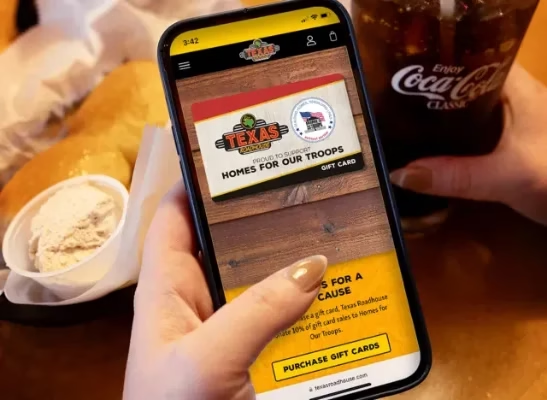
The app supports Apple Pay on iPhone for a faster checkout. You can pay with a Texas Roadhouse gift card, and buy or send gift cards from within the app.
Save Favorites and Reorder
You can favorite a location for quicker access and save meals you order often. Regular guests can reorder a past meal in seconds.
How to Use the App, Step by Step
Set Up Your Account
- Open the app and tap Sign Up.
- Enter your name, email, phone number, and birthday.
- Confirm through the email or text link.
Join the Waitlist
- Open the app and pick your location.
- Check the current estimate.
- Enter your party size and tap to join.
- Watch for the alert, then check in with the host.
Place a To-Go Order
- Choose your store and open the menu.
- Add items and set any changes.
- Pick a pickup time and pay.
- Arrive at your time and follow the pickup steps shown.
Find Your Local Texas Roadhouse
The store locator uses your phone’s location or your ZIP code to find the nearest restaurant. Most locations sit near busy roads, highways, malls, and shopping centers, so the map view helps you spot the one closest to home or work.
Favorite that store and the app opens to it every time, which makes joining the list or ordering in your city a one-tap job.
App Not Working? Common Problems and Fixes
Most app issues are simple to fix. Start with the problem that matches what you are seeing and try the suggested solution.
The estimate shows the wrong time or “no wait.”
It can lag, so call the store to confirm before you drive over.
Login errors.
Close and reopen the app, check your internet, and reset your password if needed.
Location or store not found.
Turn on location access, or search by city or ZIP code.
The app crashes or looks out of date.
Install the newest version from your store, then restart your phone.
Slow table updates and occasional login trouble are among the more common themes in app store reviews, and these steps address them.
App vs Calling Ahead: Which Seats You Faster?
Both can shorten your wait, and neither holds a table at a set time. Here is how they compare.
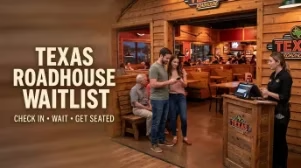
Texas Roadhouse does not take traditional reservations, so the waitlist is the closest option, though some locations may make an exception for large groups or special events. Call your local restaurant to confirm.
Is the App Worth It? (Pros and Cons)
Pros
- 01 Free to install and use
- 02 Cuts your wait on busy nights
- 03 Simple To-Go and curbside ordering
- 04 Pay from your phone
- 05 Real VIP savings
Cons
- 01 The estimate can lag behind the real wait
- 02 Some reviewers report login errors
- 03 Collects a fair amount of personal data
- 04 Not essential if you rarely visit
- 05 Reward sync can be slow after dining
Our take: if you eat at Texas Roadhouse often, it earns its space for the waitlist and the VIP offers alone. If you visit once in a while, you can skip it and still call ahead. For ways to save more, see our VIP Club guide → and gift cards guide → .